
Payment Capture Options
Automatic Payment Capture
- If you do not select "Turn on manual payment capture", then automatic payment capture is enabled, and Stripe will automatically process payment for sales as soon as the order is placed.
- With automatic payment capture, there are no additional steps to complete to capture funds.
Manual Payment Capture -1.png?width=30&height=30&name=small%20owl%20video%20play%20(30%20x%2030%20px)-1.png)
- With manual capture enabled, you must take action on a payment authorization within 7 days to receive funds for the sale.
- It's recommended to capture payment before fulfilling products.
- When you are using manual capture and have pending authorizations, you will be alerted on login that you have pending authorizations.
- You can also find a report of pending authorizations in the notification bell.
- With manual capture mode enabled, you’ll have two choices on the Sale Details view: Capture Online Payment and Void Authorization.
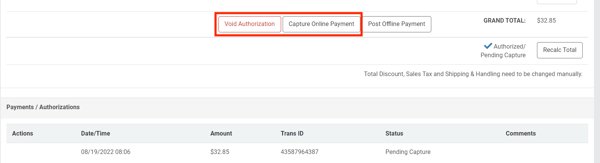
- Clicking "Capture Online Payment" means either the entire sale amount or an amount less than the sale total will be captured.
- Once clicked, a dialogue box will open where you can choose to capture the full amount or less than the full amount.
- You will be charged fees on the captured amount.
- You can only capture once.
- If you choose to capture less than the total, there is no way for you to come back later and capture the rest.
- You will not be able to capture more than the sale total.
- Clicking "Void Authorization" means the authorization will be voided and no funds will be captured.
- This process is irreversible.
- You will not be charged fees on voided authorizations.
- To void an authorization, press the Void button and confirm your choice. (Your customer will receive email notification of the voided transaction).
- Payments MUST be captured within 7 days of authorization.
- If the payment is not captured within 7 days, the authorization will expire.
- If the authorization expires then you'll need to collect payment a different way.
- Use your Stripe account instead of website admin.
- You can capture, void, or refund most transactions in Stripe.
- Affirm payments must be captured from within your website admin.
If you are capturing an Affirm payment, you cannot capture for less than the original authorized amount. If you need to adjust the order amount down, void the authorization and ask the customer to place a new order or pay another way.
Fees
- Processing fees vary based on website package and payment method.
Standard Credit Card & Express Checkout Elements
-
Applies to card payments and some Express Checkout Elements (Google Pay, Apple Pay & Amazon Pay) — they share the same fee structure.
| Core | Plus | Professional | |
| Online | 3.3% | 3.3% | 3.2% |
- Our platform fees are flat and tied to your Workstand package level.
- Rates include the Stripe base rate (2.9%) and our platform fee.
- Does not include the $0.05 (in-store) or $0.30 (online) per successful transaction fee.
- There are no monthly, batch, or other fees.
- You may be able to negotiate with Stripe for a lower base rate.
- Additional fees for manual card entry, international cards, etc. may apply.
- See Stripe's pricing page for details.
- Stripe does not return fees on refunds.
Klarna
- Klarna may be available through the Link express checkout method.
- Availability is dependent on your customers wallet.
- The fee for Klarna through Link is 6.39% plus $0.30 per successful transaction.
Affirm
-
Standalone Affirm is not an Express Checkout Element and uses its own, higher rate:
- Affirm, all packages: 6.2% + $0.30 per successful transaction.
- Affirm may be available through Google Pay, Apple Pay or Amazon Pay.
- The fees for Affirm through Google Pay, Apple Pay, or Amazon Pay are the same standard fees listed above.
- Availability of Affirm through an Express Checkout method is dependent on your customers personal wallet and Google Pay/Apple Pay/Amazon Pay settings.
Fee FAQs
Are credit card fees returned on refunded payments?
- No, Stripe does not return fees on refunds.
Will debit cards be treated differently than credit cards?
- No, credit and debit transactions have the same rate and fees.
Can I refund a credit card payment from Sale Details?
- Yes. Click here for more information on refunding a website order.
Disputes/Chargebacks
- A dispute (also known as a chargeback) occurs when a cardholder questions your payment with their card issuer.
- If a customer files a dispute against a payment made to you, Stripe will alert you via email notification and also in your Stripe Dashboard.
- Everything surrounding the dispute will be handled in your Stripe Dashboard, not in Workstand Admin.
- Helpful Stripe links regarding disputes/chargebacks:
Fraud Prevention
- Fraud cannot be prevented entirely, but there are steps you can take as a retailer to reduce instances of fraud on your website.
- Read our help center article about Limiting Fraud for more information.
- Stripe offers suggestions on their Preventing Disputes and Fraud page.
Radar
- For advanced users, Stripe offers additional fraud protection through Radar.
- Radar is not included with your Stripe account, but can be added for a fee.
- Please contact Stripe for more information.
- Because it is possible to create rules in Radar that can cause all legitimate payments to be declined, we recommend exercising extreme caution when configuring Radar.
- Radar is not included with your Stripe account, but can be added for a fee.
Workstand cannot support the rule, "Request 3D Secure if 3D Secure is required for card". This rule is disabled by default in Stripe. Enabling this rule will cause most or all legitimate payments to be automatically declined.